Day 60: Goose Race
2026-04-07
Hello! My homepage is getting boring, with all the landscape-oriented photos with the exact same aspect ratio. I oughta add a portrait of someone.
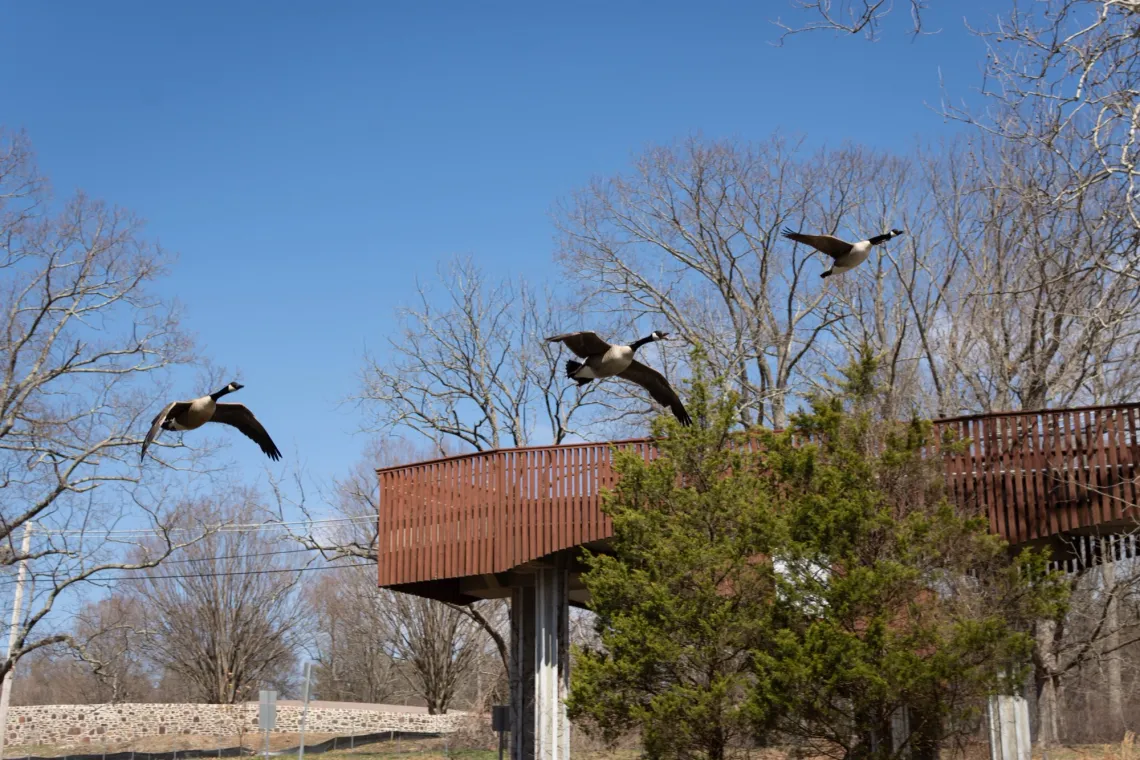
This photo is near Washington Crossing, on the New Jersey side. But the bridge to get into the state park was blocked off. They were doing a prescribed burn on some trees(!) and doing construction at the same time, so I guess they figured it was best to steer people away for the day.
So my family and I walked on the canal trail for a while. On the way back, a goose down the canal flew towards a group of geese closer to us. Within seconds of landing on the water, three geese (including the instigator) flew back down the canal as if racing.
I'm not sure if they were scared and trying to flee something (flying back to call for warning), or if they were just playing. They landed on a random spot in the canal, so it's not like there was food or a hiding spot over there.
Bless my camera's autofocus for being able to catch on to the geese in time. I don't have the fancy detection algorithms of current time. I just set the focus point and hope it can accurately guess the distance. I don't even let it continuously track — once it focuses on an object, it stays fixed at that distance until I call for it to refocus.
One of these days I should make a more detailed post ranking my editing softwares and the experience using each of them, but today, I'll draft up a short version:
- Affinity is free but feels unpolished. They're owned by Canva, which so far has a good reputation of not being evil, but more care needs to be put for photographers to really take advantage of this powerful tool. It's a great graphic design app, and I'd much rather use it over Adobe. I use it the most often, and I like learning more about this tool every time.
- Adobe's Lightroom Classic is begrudgingly the best editing software. It's overpriced, but I don't pay for it — I use the public library's shared computers (or my school's shared computers) and hope that they can keep getting away with it. It's just so damn quick and intuitive, and it's the only editing software that can work for batches of photos.
- Photopea.com is the ugly but really fun editing software. It works entirely in browser for free, so it's slow and limited, but I strangely love using it. If I'm doing light edits, I use Photopea.com.
Now I've reached Day 60 today, and it's a milestone in two ways — one, because I finally feel like the website is complete and I don't have to tinker too much with it anymore; it basically runs itself so long as I can supply it with my photos and my writing. Two, because bills are due.
I pay $21.85 USD per month to keep this website running (you can see the report at my Tip Jar) and I got an invoice a few days ago. Thank you very much to the folks who have already paid off that cost for the past sixty days; hope you're enjoying the Originals. To the rest of you, don't bother supporting unless you really want to. In reality, $21.85 USD isn't that bad, so I'm grateful that I only need to talk about expenses once every month to find a new supporter. If you want to be that new supporter, the link is below.
Thank you for visiting this blog! Reply by email, subscribe via RSS, or join the 1Day1Photo newsletter, where you can get this photo a week before the internet does :-).
Cheers,
David
Technical info, for nerds
- Camera: Nikon D7200
- Lens: Nikon AF-S DX Nikkor 35mm F1.8G
- Focal length: 35mm
- Exposure: 1/800 sec shutter speed, f/4 aperture, ISO 100
- Edited with: Adobe Lightroom Classic